Free nutrition label maker
Our Nutrition Facts label generator turns your recipe into a label: pick ingredients from USDA FoodData Central, enter the grams in your batch, and get every value per serving with FDA rounding and % Daily Values. Viewing all values is free.
Only need an ingredient list and allergens? Use the free ingredient label maker.
Your values per serving (free)
Nutrition Facts panel
Combined print-ready label (Pro)
Please tick the box above first.
- ✔ 7-day full refund, no questions asked
- ✔ Secure checkout with PayPal (card or PayPal balance)
- ✔ Nutrient data from USDA FoodData Central
- ✔ Rounding per FDA 21 CFR 101.9(c)
Recipe library (Pro)
Products are stored only in this browser. Export a backup before clearing browser data or switching devices.
What the labels look like
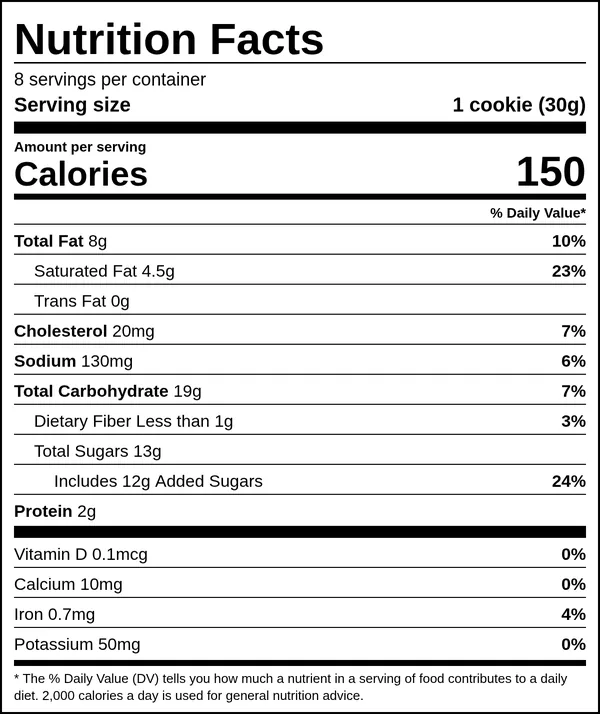
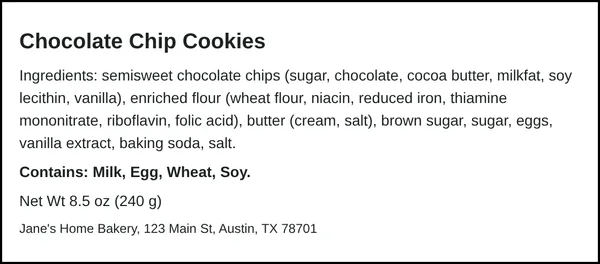
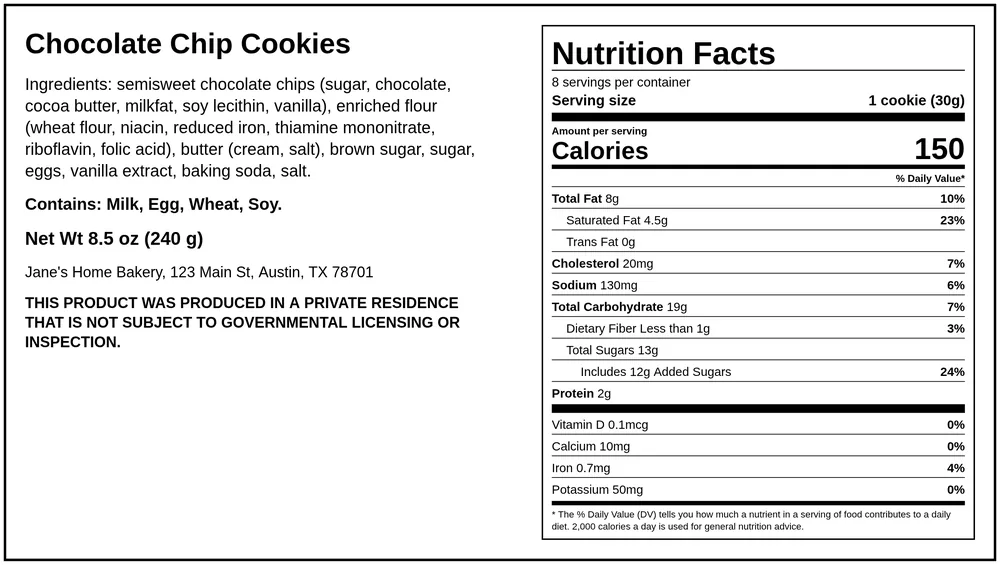
Real output from this tool for a batch of chocolate chip cookies (USDA data, FDA rounding).
How to make a Nutrition Facts label for your recipe
A Nutrition Facts label tells shoppers what is in one serving of your food. The rules for what goes on it, how it is laid out and how each number is rounded are in 21 CFR 101.9. This nutrition label maker does the math from your recipe, so you do not need a spreadsheet or a lab report to get a good estimate.
1. Enter every ingredient by weight
Weigh ingredients in grams if you can. Cup and spoon measures change with how you scoop and pack, while nutrition is calculated by weight. For each line, type the name you want printed on the label, the grams used in one batch, and pick the closest match from USDA FoodData Central. Everyday names such as "AP flour", "powdered sugar" or "unsalted butter" are mapped to the right USDA food, and small typos are tolerated.
2. Tell us the finished batch weight
Baking drives off water, so a batch of cookie dough weighs more than the baked cookies. If you weigh the batch after baking and enter that number, every value per serving is scaled correctly. If you leave it empty we use the raw ingredient total, which makes per-serving numbers come out a little low for baked goods.
3. Set the serving size
FDA bases serving sizes on "reference amounts customarily consumed" listed in 21 CFR 101.12. For example, the reference amount for cookies is 30 g, so a 30 g cookie is one serving. Enter the household measure ("1 cookie", "2 tbsp", "1/8 pie"), the grams per serving and the number of servings in the package.
4. Check the values and the rounding
The calculator adds up each nutrient for the whole batch, divides by the finished weight and multiplies by your serving size. Then it applies FDA rounding from 101.9(c): for example calories under 5 round to 0, calories up to 50 round to the nearest 5 and above 50 to the nearest 10; total fat under 0.5 g is declared as 0 g; sodium under 5 mg is 0 mg. % Daily Values use the Daily Values from the 2016 Nutrition Facts update (2,000 calories). Every value, the unrounded number and the %DV are shown for free on screen.
If an ingredient in the USDA database has no value for a nutrient (trans fat and vitamin D are often missing), you will see an orange warning, because that nutrient is counted as zero. Use the manual override fields to type numbers from your supplier's spec sheet or package.
5. Pick a format and download
The standard vertical panel fits most packages. FDA also allows a tabular (side-by-side) layout for packages without room for a tall panel, and a linear (one-paragraph) layout for very small packages. 21 CFR 101.9 paragraph (j)(13) explains when those smaller formats can be used. Pro adds clean PNG and PDF downloads of all three formats, plus a combined print-ready label with Nutrition Facts, ingredients, allergens, net weight and your business name in one image.
Do you even need a Nutrition Facts label?
Not always. FDA exempts many small businesses: retailers with low annual sales, and low-volume products from firms with fewer than 100 full-time equivalent employees selling fewer than 100,000 units of that product a year (some of them must file a notice with FDA). See the FDA small business nutrition labeling exemption page and 21 CFR 101.9 paragraph (j). Two catches: the exemption disappears if you make a nutrient content or health claim on the package (such as "low fat" or "good source of fiber"), and it never covers ingredient and allergen labeling. Cottage food sellers also need to follow their state's label rules. Our free ingredient label maker and cottage food label maker cover those parts.
How accurate is a calculated label?
FDA lets you determine nutrient values by calculation from databases as well as by lab analysis, but you are responsible for the label being accurate. A database calculation is an estimate: brands differ from USDA averages, and cooking changes water and fat content. Calculated labels work well for typical home-bakery products. If your product is unusual, makes claims, or is sold at large scale, a lab analysis is the safer choice. Learn more about what each line means on our Nutrition Facts label guide.
Frequently asked questions
Is this nutrition label maker free?
Yes. Calculating and viewing every Nutrition Facts value, %DV and the panel preview is free with no sign-up. Ingredient and allergen labels are free to download as clean PNG and PDF. Nutrition Facts Pro ($19 one-time) adds clean panel downloads, Linear and Tabular formats, the combined print-ready label and the saved recipe library.
Where does the nutrition data come from?
From USDA FoodData Central (Foundation Foods and SR Legacy), a public-domain database from the U.S. Department of Agriculture. About 2,900 common foods are included. You can override any value with numbers from your supplier.
Does it follow FDA rounding rules?
Yes. Values are rounded according to FDA rules in 21 CFR 101.9(c), and % Daily Values use the 2016 Daily Values for a 2,000-calorie diet. Our tests check the rounding rules and compare %DV against FDA sample labels.
Is the label FDA approved?
No. FDA does not approve or certify food labels. The tool calculates estimates from what you enter and USDA data; you are responsible for checking the final label.
Do small bakers need a Nutrition Facts label?
Many do not, thanks to FDA small business exemptions in 21 CFR 101.9(j), but the exemption is lost if you make nutrient content or health claims, and ingredient and allergen labeling is still required. Check FDA guidance and your state rules.
What do I get for $19?
A one-time, lifetime license for one brand: clean PNG and PDF downloads of the Nutrition Facts panel in standard, linear and tabular formats, the combined print-ready label, and a recipe library for unlimited products. Future Nutrition Facts formats are included. 7-day full refund.
Is my recipe uploaded anywhere?
No. Recipes are calculated and stored only in your browser. Pro buyers can export a backup file of their recipe library.